The Claude Playbook: How to Think, Write, Build, and Scale — All Inside One AI Session
70% of Fortune 100 companies now run on Claude, yet most founders are barely scratching the surface. The real advantage isn’t the tool—it’s the setup behind it.
Most founders are still using Claude like a search engine — ask a question, get an answer, close the tab.
It works, but it limits what the tool can actually do.
The founders seeing 10–12x results are using it differently. They’ve built Claude into their operating system, so it supports how they think, create, and execute every day. That shift alone changes how fast they can move.
Claude is no longer experimental. It’s infrastructure.
By February 2026, Anthropic reached $14 billion in annualised revenue, with 70% of Fortune 100 companies now using Claude and over 500 organisations paying more than $1 million per year for access. This isn’t a chatbot people are testing — it’s something serious businesses are running on.
The difference isn’t technical skill. It’s intent.
The founders getting the most out of Claude have set it up properly — with context, structure, and a clear operating model — which is why their outputs are faster, more consistent, and far more aligned to their business.
If you’re not seeing that level of output yet, it usually comes down to setup.
At a practical level, that means:
• Treat Claude as a system, not a tool • Load it with context (brand, audience, offers) • Structure your prompts instead of writing casually
This is the playbook.
💡
If you set this up properly, Claude stops being something you use…
The Three Things Most Founders Are Missing
1. They Have Not Set Up Claude Projects
Claude Projects are persistent workspaces where you load context — your brand guidelines, audience, offers, SOPs, templates, and past content — and keep it available across every interaction. Instead of starting from zero each time, Claude already understands how your business operates.In practice, this means you stop re-explaining who you are, what you do, and how you communicate. You simply start working.A solopreneur might create one Project per client, while a founder running multiple brands would structure one per brand. Once this is set up properly, the difference is immediate: outputs stop feeling generic and start reflecting your business from the very first response.If you’re not using Projects yet, start with one for your core brand and load it with your key documents. That alone will lift the quality of everything you produce.
2. They’re Not Structuring Their Prompts
Claude responds very differently depending on how instructions are given.Most founders write prompts casually, as if they are messaging a colleague. It works, but it leaves too much open to interpretation, which is why outputs often feel inconsistent.The founders getting reliable, high-quality results take a more structured approach. They define the role Claude should play, provide the relevant context, specify the task clearly, and outline the expected format.Using simple XML-style structure — such as , , and — forces clarity, and that clarity translates directly into better outputs.If you want immediate improvement, take one task you run regularly and rewrite the prompt with clear structure. The difference is noticeable straight away.
3. They’re Not Routing Tasks to the Right Model
Claude is powerful, but it’s not built for everything.The real advantage comes from understanding where each tool performs best and using them accordingly. Claude excels at long-form writing, structured thinking, and deep analysis. ChatGPT is faster for short-form content and automation workflows. Gemini is strongest when real-time data or Google Workspace integration is required.The founders getting the most out of AI are not loyal to a single tool. They treat each model as part of a system and route tasks based on what needs to be done.A simple way to start is to map your most common tasks — writing, research, automation, and data — and assign each one to the model that handles it best. Once that becomes part of your workflow, both speed and output quality improve.
💬
"The primary skill of a founder is no longer writing code. It is orchestrating AI — knowing what to give it, how to structure the brief, and how to route the output." — The AI Corner, 2026
Three Actions to Get Claude Working Properly — This Week
Create your first Claude Project. Go to claude.ai, open Projects, and set one up for your primary brand. Upload your brand voice guide, a sample of your best content, your offer descriptions, and a clear audience profile. Name it properly. From that point on, every session starts with context — and the quality of output improves immediately.
Write one structured prompt using XML tags. Take a task you run often — a newsletter intro, a post, or research summary — and rebuild the prompt with structure. Define the role, add context, specify the task, and outline the output format. Even a simple structure using,, and <output_requirements> will produce noticeably better, more consistent results.
Map your task stack to the right model. List the core AI tasks you perform each week — writing, research, automation, and data handling — and assign each to the model best suited for it. Use Claude for deep thinking and long-form work, ChatGPT for speed and execution, and Gemini for real-time data and integrations. Once this routing becomes part of your workflow, you remove friction and move significantly faster.
🆓 AI Prompt — Set Up Your First Claude Project System
Tool: ClaudeUse case: Build a high-performance system prompt for your Claude ProjectI am setting up a Claude Project to act as a persistent operating system for my business. I need you to write a comprehensive system prompt that will live in the Project instructions field and ensure every output is aligned with my brand, thinking, and standards.Business context:Brand name: [your brand name]What I do: [clear description of your business or service]Target audience: [who I serve, including their level of awareness and goals]Brand voice: [3–5 descriptors — e.g. direct, strategic, no-fluff, operator-level]Core use cases: [3–5 tasks I regularly use AI for — e.g. newsletters, posts, research, systems]Preferred language: [phrases, tone patterns, or positioning I want used consistently]Avoid: [phrases, tone styles, or language I do NOT want used]Your task:Write a system prompt in second person (“You are…”) that defines how Claude should operate inside this Project at all times.The system prompt must include:Role definitionWho Claude is in the context of my businessThe level of thinking and execution expected (founder-level, strategic, no generic output)Audience awarenessWho the output is forHow to adjust tone, depth, and clarity based on that audienceTone and writing rulesHow Claude should sound (sentence flow, structure, style)What to avoid (generic phrasing, filler language, over-explaining)Output standardsAlways structured, clear, and immediately usableDefault to concise but complete (no unnecessary length)Prioritise clarity, insight, and execution over theoryContent behaviourMatch tone to platform when specified (LinkedIn, email, Ghost, etc.)When relevant, include hooks, structure, and strong closing statementsAvoid surface-level advice — always aim for practical, implementable outputConstraintsNever produce generic “creator-style” contentNever assume context is known unless providedAlways prioritise business outcomes, leverage, and scalabilityThe final output should be:Cleanly formattedReady to paste directly into the Claude Project instructionsWritten as a persistent instruction set, not an explanation
The Claude Operating System for Founders
The Four Project Setups Every Founder Should Build
These are not generic Projects. They are four distinct operating environments, each designed for a specific type of work. Set them up once, and they continue to compound over time.
Project 1 — Brand Brain
What to upload: Your brand voice guide, tone examples, audience description, offer positioning, preferred and banned phrases, and examples of content you want to replicate.
System prompt focus: Claude acts as the brand voice guardian for [brand], ensuring every output reflects your tone — direct, strategic, and free from generic language. Every piece should read as if it came from you, written for founders who value clarity and execution.
Best for: Newsletter drafts, social posts, email sequences, landing pages, DM scripts, and offer positioning.
Why it compounds: Over time, this Project builds consistency across everything you create. Claude begins to internalise your voice and decision patterns, meaning every new piece of content starts closer to the final version.
Project 2 — Content Engine
What to upload: Your content pillars, top-performing posts, hook frameworks, platform-specific notes, and your content calendar structure.
System prompt focus: Claude operates as a content strategist, turning ideas and research into platform-ready content with strong hooks, clear structure, and a sharp close. Tone is adapted to each platform while avoiding generic “creator-style” output.
Best for: Hook writing, captions, YouTube outlines, carousel structures, and repurposing content across channels.
Why it compounds: One input can generate multiple high-quality outputs. Instead of creating content piece by piece, you build a system that produces consistently across platforms in a fraction of the time.
Project 3 — Research Analyst
What to upload: Industry reports, competitor analysis, market insights, customer feedback, call transcripts, and product documentation.
System prompt focus: Claude functions as a strategic analyst, synthesising information, identifying patterns, and delivering structured insights with clear implications. The focus is not on summarising, but on extracting what actually matters.
Best for: Research synthesis, competitor breakdowns, customer analysis, and preparation for strategic decisions.
Why it compounds: With access to large volumes of context, Claude can process and connect information that would otherwise take hours. Insights become faster, deeper, and more actionable.
Project 4 — Ops Brain
What to upload: SOPs, process maps, onboarding documents, templates, team roles, and workflow notes.
System prompt focus: Claude acts as an operations assistant with full visibility into how the business runs. It references existing systems before suggesting changes, defaults to simplification, and flags unnecessary complexity.
Best for: Building and refining SOPs, improving workflows, drafting onboarding materials, and planning automations.
Why it compounds: As your systems improve, so does the quality of operational output. Claude stops giving generic advice and starts working within the structure of your business, making every recommendation more precise.
The XML Prompting Framework
When you move beyond basic prompts, structure starts to matter.
Claude responds differently when instructions are clearly defined, and one of the most effective ways to do that is by using a simple XML-style framework. It removes ambiguity, forces clarity, and consistently produces more structured, accurate outputs.
Use this as your default architecture for any task that requires precision:
The Simple Prompt Framework (Non-Technical Version)If the structured version feels too technical, use this instead.Think of it as giving Claude a clear brief — the same way you would brief a team member.Just follow this format:1. Who it should act asTell Claude who it is.Example: “You are a strategic content writer for a founder brand.”2. What it needs to knowGive it the background.Who is this for? What’s the goal? What’s the context?3. What you want it to doBe specific about the outcome.Example: “Write a LinkedIn post that explains X and drives engagement.”4. Any rules to followSet clear boundaries.Tone, length, style, things to include or avoid.5. How you want the output structuredTell it exactly how to format the answer.Example: “Give me 3 hook options, then the full post, then a closing CTA.”Example:“You are a strategic content writer for a founder brand.This is for entrepreneurs building personal brands using systems and AI.Write a LinkedIn post explaining why most founders struggle with consistency.Keep the tone direct, practical, and no fluff. Avoid generic creator language.Give me 3 hooks, then the full post, then a short CTA.”The goal isn’t to overcomplicate it.It’s to be clear.The clearer your instructions, the better the output.
💡
The goal is not to make prompts more complex, but more intentional.
The Multi-Model Routing Table
Stop using one AI for everything. Route each task to the model built for it and your output quality doubles while your time halves.
Task Type
Best Model
Why
Long-form content, newsletters, proposals
Claude
Strongest on nuance, tone, and structured long-form. Stays on-brand longer.
Document analysis, research synthesis
Claude
1M token context window. Handles full reports in one session without losing thread.
Strategic planning, frameworks, SOPs
Claude
Best reasoning depth. Produces structured, logical outputs consistently.
Quick social captions, fast short copy
ChatGPT
Faster response, strong on punchy short-form. GPT-5.4 excels at speed tasks.
Automation workflows, multi-tool tasks
ChatGPT
Better plugin integrations and desktop automation. Routes between tools cleanly.
Image generation
ChatGPT
DALL-E integration is native. Far stronger than Claude for visual generation.
Real-time data, current events
Gemini
Google Search integration. Best for anything requiring live or recent data.
Google Workspace tasks
Gemini
Native integration with Docs, Sheets, Gmail, Calendar. Tightest workflow.
YouTube research and analysis
Gemini
Can understand YouTube videos directly. Unmatched for video-based research.
Claude's MCP Integration Stack
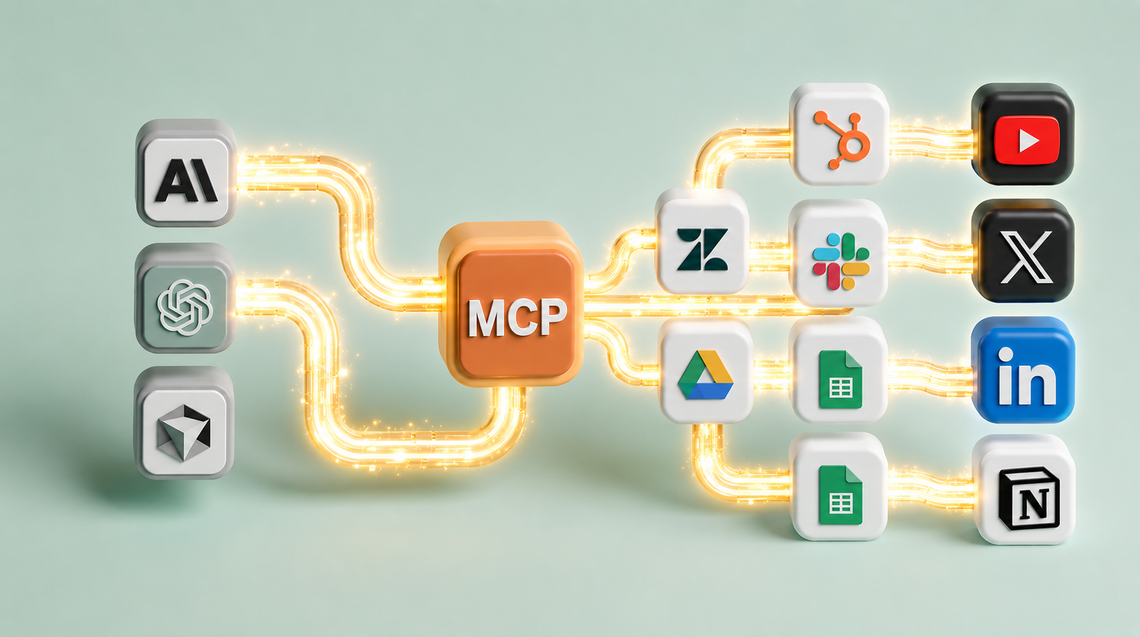
Model Context Protocol (MCP) is the open standard that lets Claude connect directly to external platforms — read from them, write to them, and act on them without custom development. For founders running the Founders & Systems stack, these are the most valuable connections:
Google Drive / Docs — Claude reads and writes directly to your Drive. Brief it on a document and it edits it in place. No copy-paste.
Google Sheets — Claude can read your data, run analysis, and write outputs back to Sheets. Newsletter tracking, content calendars, audience data — all accessible mid-session.
Notion / Obsidian — Upload knowledge bases into Claude Projects or connect via MCP for live read access during sessions. Your second brain becomes Claude's reference layer.
GitHub — For any founder building products, Claude reads codebases, reviews pull requests, and writes code that stays consistent with your existing architecture.
Zapier — Connect Claude to any automation trigger. When Claude completes a task, Zapier can push the output to Kit, Circle, Squarespace, or wherever it needs to go automatically.
🔐 Paid Prompt 1 — Claude | Build Your Brand Brain Project in 15 Minutes
``` I am setting up a Claude Project called "Brand Brain" for my business. I need you to help me build everything required to make this Project fully operational today. My business: [describe your brand and what you do] Audience: [who you serve] Brand voice: [3-5 descriptors] My best content example: [paste or describe a piece of your best content] Things I produce most often: [list 3-5 output types] Based on this, produce: 1. A full Project system prompt (200-300 words) I can paste directly into the Claude Project instructions 2. A list of 5 documents I should upload into this Project to give Claude maximum context 3. A suggested folder structure for organising my Project files 4. Three test prompts I should run after setup to verify the Project is working correctly 5. A monthly maintenance checklist — what to update in the Project as my business evolves Make everything copy-paste ready. No filler. ```
🔐 Paid Prompt 2 — ChatGPT | Build Your Personal AI Routing Workflow
``` I use Claude, ChatGPT, and Gemini for different tasks in my business. Help me build a personal AI routing system — a clear decision framework that tells me which model to use for which task without having to think about it each time. My regular AI tasks include: [list 8-10 things you use AI for regularly] My primary platforms are: [Instagram / YouTube / Email / Community / Website — list yours] My business type: [describe briefly] Produce: 1. A personalised routing table mapping each of my tasks to the optimal model with a one-line reason 2. A simple decision tree I can screenshot and reference daily (text format is fine) 3. The 3 tasks where I am most likely currently using the wrong model — and why 4. A suggested daily AI workflow: what to open first, what to run in parallel, what to batch 5. One automation I could build with Zapier that would handle AI task routing for me automatically Keep it practical. I want to implement this today, not think about it for a week. ```
🔐 Paid Prompt 3 — Gemini | Audit Your Current AI Usage and Find the Gaps
``` I want an honest audit of how I am currently using AI in my business and where the biggest leverage gaps are. Here is how I currently use AI: [describe your current AI habits — what you use, how often, for what] Here is what I spend the most time on manually each week: [list your biggest time drains] My business stage: [describe where you are — early, growing, scaling] Revenue range: [optional — helps calibrate the advice] Run the audit: 1. Identify the 3 biggest AI leverage gaps in my current workflow — tasks I am doing manually that I should be automating or delegating to AI 2. Estimate the weekly hours I could recover if I fixed each gap 3. Prioritise the gaps by: ease of implementation, time saved, and revenue impact 4. Give me a 2-week implementation plan — Week 1 quick wins, Week 2 deeper builds 5. Name the one Claude Project I should build first based on my current situation, and give me the exact system prompt to set it up Ground your recommendations in what founders at my stage are actually doing — not what sounds impressive in theory. ```
The £0 AI Stack Running My Entire Business Backend.
You're using one AI tool for everything and getting 60% of the capability. Here's the £0 stack — Claude + ChatGPT + Gemini routed correctly — that runs my entire backend.
#NFF · Automated Backend → Creative Frontend
The clean dividing line. The backend (automation · AI · systems) runs hands-off. The frontend (camera · voice · story · me) is 100% personal. When you draw the line clean, you get scale and soul at the same time.
#NFF · The 7 Claude Skills I'd install by Sunday if I were starting over
Total install time: under 20 minutes per Skill. Total hours saved per week: about 12. Paste-ready. No code. If you switch one on this weekend, you'll wonder how you ran without it.
members only
AI Integration
This Prompt Wrote 30 Days of Content in 4 Minutes. I'm Not Joking.
I built one Claude prompt that produced 30 days of social content in 4 minutes 23 seconds. The trick isn't the model — it's the 5-block prompt architecture. Here's the full build.
members only
AI Integration
The 15-Minute Morning AI Routine That Replaced My £3,000 Consultant
I used to pay £3,000/month for a strategic consultant. A 15-minute morning AI routine now does 80% of what they did — daily, not monthly. Here's the exact 3-phase system.
Founders and Systems tier
AI Integration
MCPs Are the Cheat Code for Founders. Here Are the 5 I Run Every Day.
Most founders use Claude like a chatbot. MCPs turn it into a system that runs parts of your business. Here are the 5 I use daily — and what they replace.














Member discussion